So, it's been a week since I've switched to Linux now. A bit over a week now, actually. I've had time to acclimate & get used to doing things a bit "differently" than what I was used to with Windows, but overall - I'd say I've gotten to the point where I no longer really feel the difference between how I did things with Windows & how I do things with Linux.
The road was a bumpy one though and frankly - I still have loose ends with Linux that I'm dying to iron out, but little by little I'll figure it out I guess.
Also, truthfully, this post was meant to be put up much earlier than now but I forgot to save my previous post & lost it because I misclicked the back button...and Weebly does not have an autosave feature for some reason. Then again, what I wrote in the previous post was probably too bloated & emotional anyway. Without further ado, let's get into how the Linux adventure has been for me so far.
The road was a bumpy one though and frankly - I still have loose ends with Linux that I'm dying to iron out, but little by little I'll figure it out I guess.
Also, truthfully, this post was meant to be put up much earlier than now but I forgot to save my previous post & lost it because I misclicked the back button...and Weebly does not have an autosave feature for some reason. Then again, what I wrote in the previous post was probably too bloated & emotional anyway. Without further ado, let's get into how the Linux adventure has been for me so far.
Switching out of Wayland
A majority of the issues outlined in my previous post, such as the clipboard not working & Firefox refusing to co-operate were actually the result of Wayland, believe it or not.
I've heard many warnings from all walks of life that Nvidia GPUs & Linux don't really tend to mix together. While the Linux kernel has an open-source driver for it called Nouveau & Nvidia technically does provide drivers for Linux, I've heard from many people all across the web that Nvidia GPUs don't tend to mesh together with Linux all too well. It's why most people just recommend using AMD instead because AMD open-sources their drivers & lets people fix any issues that arise when using Linux.
I don't have the luxury of just swapping out my RTX 3060 for a different GPU though so I'm stuck with what I have. The way I installed KDE Plasma when I first installed Fedora was just installing the default KDE Plasma package that you get when you type in the terminal command for it, and KDE Plasma (to my understanding) comes with Wayland as the default.
Wayland sucks on Nvidia. Yes, my clipboard & Firefox woes were caused by it but I've also experienced many graphical freakouts on the way as well. I'll show what I'm talking about in a later section of this post but yeah, the experience wasn't pleasant.
A guy from Mastodon then told me to try installing KDE Plasma with X11 instead & try using that, gave me the terminal command to install it. Tried it & all of a sudden - every major issue I've had with Linux vanished almost simultaneously...but a few others cropped up along the way.
I've heard many warnings from all walks of life that Nvidia GPUs & Linux don't really tend to mix together. While the Linux kernel has an open-source driver for it called Nouveau & Nvidia technically does provide drivers for Linux, I've heard from many people all across the web that Nvidia GPUs don't tend to mesh together with Linux all too well. It's why most people just recommend using AMD instead because AMD open-sources their drivers & lets people fix any issues that arise when using Linux.
I don't have the luxury of just swapping out my RTX 3060 for a different GPU though so I'm stuck with what I have. The way I installed KDE Plasma when I first installed Fedora was just installing the default KDE Plasma package that you get when you type in the terminal command for it, and KDE Plasma (to my understanding) comes with Wayland as the default.
Wayland sucks on Nvidia. Yes, my clipboard & Firefox woes were caused by it but I've also experienced many graphical freakouts on the way as well. I'll show what I'm talking about in a later section of this post but yeah, the experience wasn't pleasant.
A guy from Mastodon then told me to try installing KDE Plasma with X11 instead & try using that, gave me the terminal command to install it. Tried it & all of a sudden - every major issue I've had with Linux vanished almost simultaneously...but a few others cropped up along the way.
X11 didn't start out smooth
When I first installed KDE Plasma X11, the first thing that I immediately noticed was that my mouse felt...off. It's then that I realized that mouse acceleration was permanently enabled, despite the fact that I unchecked the setting in System Settings for it.
I can't stand mouse acceleration. It messes with my aim in FPS games & osu!, and generally just doesn't make for a great user experience for me. The mouse feels imprecise with it & often feel like I'm fighting with it more than I'm using the computer.
So, with some guidance from folks in various Discord servers knowledgeable about this kind of stuff, what I ended up doing is I created a file in /etc/X11/xorg.conf.d/ called 40-libinput.conf and pasted the following:
Section "InputClass"
Identifier "libinput pointer catchall"
MatchIsPointer "on"
MatchDevicePath "/dev/input/event*"
Driver "libinput"
Option "AccelProfile" "flat"
EndSection
After making the file, pasting the above in there & rebooting - my mouse was fixed! Felt usable, finally.
But there was another issue. Sometimes, for an inexplicable reason, one of my monitors would just fail to start up. I'm running a 3 monitor setup, 2 of which are running at 60hz and my primary one is a 144hz panel. The 144hz monitor would usually be the one that would fail to initialize and I'd be stuck with 2 monitors, but it's not consistent. Sometimes one of the 60hz monitors would fail to start up in the same way.
Unfortunately I didn't find the reason for this happening but often times a system reboot would just fix the issue so I don't see it as that big of a deal.
Though despite the issues I've come across thus far, I'd still say that it was worth the switch from Wayland to X11 in my specific use-case, since I'd rather just have games not start up with garbled graphics & for my clipboard to work as it should...it even fixed unplayable flickering in osu!lazer & somehow fixed Vulkan failing to initialize on it!
I can't stand mouse acceleration. It messes with my aim in FPS games & osu!, and generally just doesn't make for a great user experience for me. The mouse feels imprecise with it & often feel like I'm fighting with it more than I'm using the computer.
So, with some guidance from folks in various Discord servers knowledgeable about this kind of stuff, what I ended up doing is I created a file in /etc/X11/xorg.conf.d/ called 40-libinput.conf and pasted the following:
Section "InputClass"
Identifier "libinput pointer catchall"
MatchIsPointer "on"
MatchDevicePath "/dev/input/event*"
Driver "libinput"
Option "AccelProfile" "flat"
EndSection
After making the file, pasting the above in there & rebooting - my mouse was fixed! Felt usable, finally.
But there was another issue. Sometimes, for an inexplicable reason, one of my monitors would just fail to start up. I'm running a 3 monitor setup, 2 of which are running at 60hz and my primary one is a 144hz panel. The 144hz monitor would usually be the one that would fail to initialize and I'd be stuck with 2 monitors, but it's not consistent. Sometimes one of the 60hz monitors would fail to start up in the same way.
Unfortunately I didn't find the reason for this happening but often times a system reboot would just fix the issue so I don't see it as that big of a deal.
Though despite the issues I've come across thus far, I'd still say that it was worth the switch from Wayland to X11 in my specific use-case, since I'd rather just have games not start up with garbled graphics & for my clipboard to work as it should...it even fixed unplayable flickering in osu!lazer & somehow fixed Vulkan failing to initialize on it!
osu! (stable) on Linux was more work than I expected
One of the early goals I had set out for myself was not just to get osu!lazer up & running, but to also get my Windows backup of my osu! (stable) install going as well. Truthfully I believed that the process would be as simple as just installing Wine & running the osu!.exe file under Wine. That train of thought didn't get me very far.
So I got some help from a guy called Ravener, who came across my Linux-related posts on Mastodon. They actually started out with the osu!lazer flickering issues I mentioned above & helped me solve it under Wayland, as well as gave me a genuinely useful resource to use called "Gear Lever" for AppImage management.
Anyway, the steps I had to go through to get osu! (stable) working on Linux were as follows:
So I got some help from a guy called Ravener, who came across my Linux-related posts on Mastodon. They actually started out with the osu!lazer flickering issues I mentioned above & helped me solve it under Wayland, as well as gave me a genuinely useful resource to use called "Gear Lever" for AppImage management.
Anyway, the steps I had to go through to get osu! (stable) working on Linux were as follows:
- Set up osu-winello
- Realize I am an idiot and do not know how hidden folders on Linux work (CTRL+H btw)
- Install/update winetricks
- Configure fonts & fail at it (for JP/KR/CHS/CHT/etc. text to show up properly)
- Download the osu! installer & run it under Wine after putting all the necessary files in necessary directories
- Figure out why the osu! installer isn't starting & fix it (had to rename the install file)

This is what I was talking about with garbled graphics under Wayland, by the way. osu! isn't the only game that did this under Wayland for me, I had similar freakouts with the likes of Sonic Origins as well a couple of times.
The way to temporarily fix this was to press ALT+ENTER to enter windowed mode, then I could go back to full screen. But I got osu! to run on Linux!
The way to temporarily fix this was to press ALT+ENTER to enter windowed mode, then I could go back to full screen. But I got osu! to run on Linux!
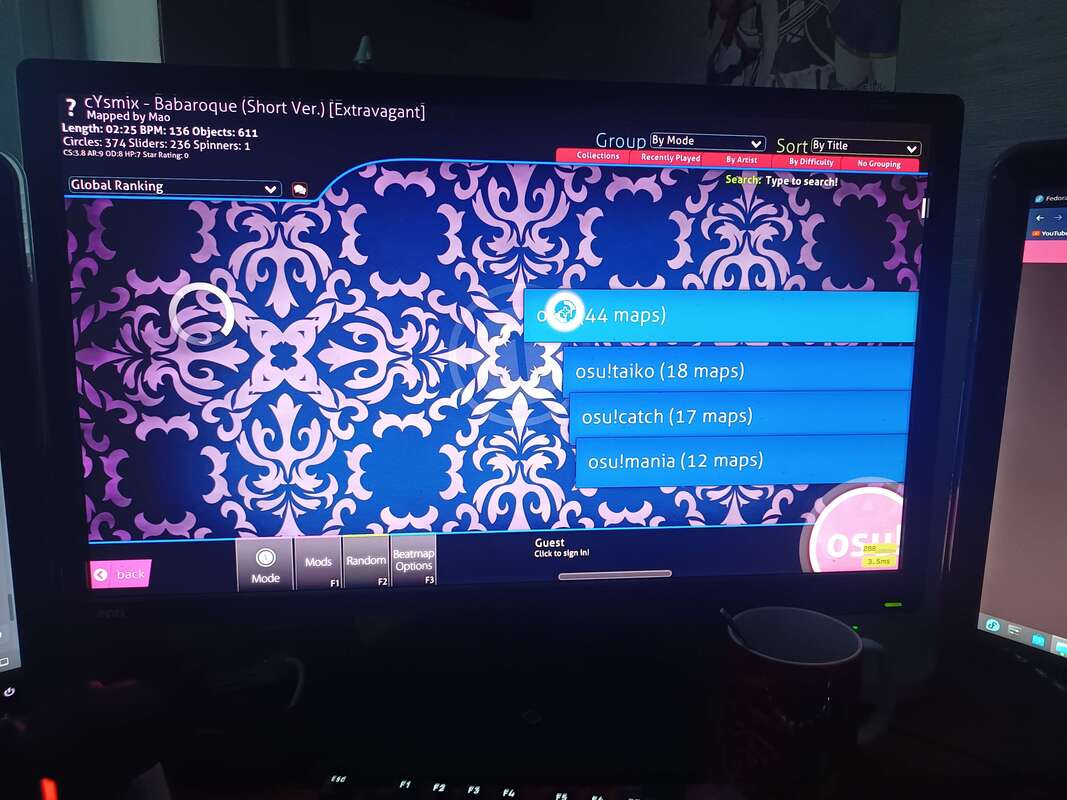
After that, I had to fix some stuff in order for the game to not cap its framerate to my monitor, install gamemode for further optimizations (I think?) & create shell scripts to launch the game natively without needing to go through my terminal every single time.
Oh, and fix the non-standard character fonts too. Those were showing up as squares. Fortunately, I was handed a nice handy-dandy install for those character sets which...I might actually back up on my site at some point, since the way you find it right now is...tedious to say the least, yeah.
I did freak out a couple of times when installing it, since it spewed errors out at me when installing, since it was trying to add registry entries that literally can't exist because we're on Linux, not Windows, but I was just told to ignore all of them & let everything else install as needed.
After that was all said & done, all I had to do then was just migrate my osu! install to the environment I had just set up, create a Desktop shortcut for osu! & I was done!
Oh, and fix the non-standard character fonts too. Those were showing up as squares. Fortunately, I was handed a nice handy-dandy install for those character sets which...I might actually back up on my site at some point, since the way you find it right now is...tedious to say the least, yeah.
I did freak out a couple of times when installing it, since it spewed errors out at me when installing, since it was trying to add registry entries that literally can't exist because we're on Linux, not Windows, but I was just told to ignore all of them & let everything else install as needed.
After that was all said & done, all I had to do then was just migrate my osu! install to the environment I had just set up, create a Desktop shortcut for osu! & I was done!
Woes with Hauppauge
There are things I am unhappy about with Linux though, albeit these things aren't necessarily the fault of Linux itself. Just an unfortunate side effect.
Namely, I cannot seem to get my capture card - the Hauppauge HD PVR 2 - to work with Fedora Linux. The capture card itself is very old. It's also not very good. I don't complain though, because it was the first ever IRL donation I received from the days when I used to livestream (thank you again crafciak31!).
Sadly, because this capture card is so old, the only distro Hauppauge provides drivers for is an old version of Ubuntu. Or, well, any Debian-based distro would work, I suppose. I think you can get it installed under Fedora Linux too but I've just decided that trying to get this ancient thing to work with my Linux install is honestly more effort than it's worth. I saw that there was a repo for a community-made driver for it but it hasn't been maintained in a very long time & saw that you can't get it to work with OBS or get audio streaming to function so I quickly shelved the idea.
Maybe if there's someone knowledgeable enough with this topic who can help me set it up so it can capture both video & audio through OBS, then I'd be more than willing to set aside some time to tinker with it to try & get it going, but right now, seeing how almost utterly hopeless it is to get it to work, I've given up. If I ever need to use the capture card again, I still have my Windows 11 laptop that I can plug it into, I guess.
Namely, I cannot seem to get my capture card - the Hauppauge HD PVR 2 - to work with Fedora Linux. The capture card itself is very old. It's also not very good. I don't complain though, because it was the first ever IRL donation I received from the days when I used to livestream (thank you again crafciak31!).
Sadly, because this capture card is so old, the only distro Hauppauge provides drivers for is an old version of Ubuntu. Or, well, any Debian-based distro would work, I suppose. I think you can get it installed under Fedora Linux too but I've just decided that trying to get this ancient thing to work with my Linux install is honestly more effort than it's worth. I saw that there was a repo for a community-made driver for it but it hasn't been maintained in a very long time & saw that you can't get it to work with OBS or get audio streaming to function so I quickly shelved the idea.
Maybe if there's someone knowledgeable enough with this topic who can help me set it up so it can capture both video & audio through OBS, then I'd be more than willing to set aside some time to tinker with it to try & get it going, but right now, seeing how almost utterly hopeless it is to get it to work, I've given up. If I ever need to use the capture card again, I still have my Windows 11 laptop that I can plug it into, I guess.
Other misc. things that happened
One of the more eventful & funny things that happened was when I accidentally killed my entire OS because I decided that I wanted to reformat my now-formerly NTFS drives into EXT4, so I'd stop having issues with running games on Steam.
Before doing the conversion, obviously I backed up all of the important data on them onto an external 2TB hard drive I have with an adapter so that I don't lose anything important. Then just thought it'd be as simple as going into KDE Partition Manager & reformatting the drives. Haha, how foolish, looking back at it...
Because I also completely forgot that I manually edited my fstab file. And I forgot to edit the fstab file before reformatting. That caused my OS to absolutely freak out, to the point I had to boot into a Linux Mint environment through a Live USB in order to comment out the lines I wrote...then I had to re-edit my fstab file again to properly mount my now-EXT4 drives, after also figuring out why they were showing up as removable media of course (hint: DISABLE SATA HOT-PLUGGING IN YOUR BIOS PLEASE).
Another annoying thing that happens is that some games, particularly Source Engine games such as Team Fortress 2, for whatever reason, force my 144hz monitor's refresh rate all the way down to...24hz...? And if I attempt to manually change the refresh rate back to 144hz - it...crashes my whole OS, forcing me to hard reboot...thank goodness for the -freq 144 launch option, otherwise I would've been on my way to ProtonDB to complain that TF2 runs like shit on Linux or something.
Oh, and I had to completely disable sleep mode. Why? Because every time my computer wakes from sleep, one random monitor for an inexplicable reason will be permanently dimmed to about 30% brightness. And if you attempt to raise said brightness back to 100%, it crashes the whole video driver, causing me to have to hard reboot the computer...again. There's probably a solution for this but I didn't bother with it. I don't need sleep mode on my primary desktop computer anyway so I didn't have any problems just parting ways with it entirely.
Before doing the conversion, obviously I backed up all of the important data on them onto an external 2TB hard drive I have with an adapter so that I don't lose anything important. Then just thought it'd be as simple as going into KDE Partition Manager & reformatting the drives. Haha, how foolish, looking back at it...
Because I also completely forgot that I manually edited my fstab file. And I forgot to edit the fstab file before reformatting. That caused my OS to absolutely freak out, to the point I had to boot into a Linux Mint environment through a Live USB in order to comment out the lines I wrote...then I had to re-edit my fstab file again to properly mount my now-EXT4 drives, after also figuring out why they were showing up as removable media of course (hint: DISABLE SATA HOT-PLUGGING IN YOUR BIOS PLEASE).
Another annoying thing that happens is that some games, particularly Source Engine games such as Team Fortress 2, for whatever reason, force my 144hz monitor's refresh rate all the way down to...24hz...? And if I attempt to manually change the refresh rate back to 144hz - it...crashes my whole OS, forcing me to hard reboot...thank goodness for the -freq 144 launch option, otherwise I would've been on my way to ProtonDB to complain that TF2 runs like shit on Linux or something.
Oh, and I had to completely disable sleep mode. Why? Because every time my computer wakes from sleep, one random monitor for an inexplicable reason will be permanently dimmed to about 30% brightness. And if you attempt to raise said brightness back to 100%, it crashes the whole video driver, causing me to have to hard reboot the computer...again. There's probably a solution for this but I didn't bother with it. I don't need sleep mode on my primary desktop computer anyway so I didn't have any problems just parting ways with it entirely.
Gaming is less painful than I thought it would be
Processing Vulkan shaders is a huge pain though, every time I start any game on Steam. However, I am genuinely surprised at how good & versatile Valve's Proton tool is on Steam.
I've been trying to actively report findings on ProtonDB about games I've tried out on Linux thus far, and despite a couple of hiccups here & there, I'm able to play pretty much every single game under the sun that I would want!
I am, however, starting to miss Honkai Star Rail a little bit, since I know that game will just not work on Linux. Or if there is a method of getting it to work, it's most likely way more effort than I'm willing to put in for it.
Parting ways with Star Rail does sting a bit, especially since I don't really have a way to play it anymore now. Sure, I could play on my phone, but I'm really not much of a mobile gamer anymore. My Girls' Frontline phase ended back in 2020. I could also run it on my laptop but the game takes up an ungodly amount of space & the poor 240GB SSD in my laptop doesn't have much more wiggle-room left, especially since I loaded it up with osu! maps in anticipation of COE 2024. So I guess I'll just have to live without Star Rail then, none of the consoles that I own can run it either so...oh well. Maybe one day HoYoverse will release a native Linux port (they won't).
Other than that though, yeah, anything & everything I want to play - Overwatch 2, Need for Speed Hot Pursuit Remastered, Palworld - all of them work & play wonderfully on Linux, which I was very surprised with. I guess I'll have to find out how the likes of Cyberpunk 2077 and Forza Horizon 4 fare on Linux though.
I've been trying to actively report findings on ProtonDB about games I've tried out on Linux thus far, and despite a couple of hiccups here & there, I'm able to play pretty much every single game under the sun that I would want!
I am, however, starting to miss Honkai Star Rail a little bit, since I know that game will just not work on Linux. Or if there is a method of getting it to work, it's most likely way more effort than I'm willing to put in for it.
Parting ways with Star Rail does sting a bit, especially since I don't really have a way to play it anymore now. Sure, I could play on my phone, but I'm really not much of a mobile gamer anymore. My Girls' Frontline phase ended back in 2020. I could also run it on my laptop but the game takes up an ungodly amount of space & the poor 240GB SSD in my laptop doesn't have much more wiggle-room left, especially since I loaded it up with osu! maps in anticipation of COE 2024. So I guess I'll just have to live without Star Rail then, none of the consoles that I own can run it either so...oh well. Maybe one day HoYoverse will release a native Linux port (they won't).
Other than that though, yeah, anything & everything I want to play - Overwatch 2, Need for Speed Hot Pursuit Remastered, Palworld - all of them work & play wonderfully on Linux, which I was very surprised with. I guess I'll have to find out how the likes of Cyberpunk 2077 and Forza Horizon 4 fare on Linux though.
Life updates!
Since I don't know how to properly end blog posts like this, I'm just gonna stick a quick life update.
Tomorrow, June 28th, is going to be my last day at my current job. It's gonna be a bittersweet day for me, that's for sure. But leaving the job I'm currently at is the best thing that I can do right now. Don't wanna get too deep into these types of personal matters but yeah. At least I'll have the entirety of next week off to kick back, relax, go on a short trip or something, and just enjoy life itself.
That's all I have for now. Thanks for reading!
- huu
Tomorrow, June 28th, is going to be my last day at my current job. It's gonna be a bittersweet day for me, that's for sure. But leaving the job I'm currently at is the best thing that I can do right now. Don't wanna get too deep into these types of personal matters but yeah. At least I'll have the entirety of next week off to kick back, relax, go on a short trip or something, and just enjoy life itself.
That's all I have for now. Thanks for reading!
- huu
 RSS Feed